編譯模式
Understand how the rendering modes of Master CSS work and enhance your website's performance.
It can be runtime, zero-runtime, or even hydration.
Overview
Master CSS integrations choose how generated rules reach the browser. The same project CSS entry graph can be used by runtime rendering, static rendering, server rendering, and progressive hydration.
| Mode | Description |
|---|---|
'runtime' | Starts CSSRuntime in the browser, loads the project manifest, observes connected elements, and ensures generated rules as class names appear. |
'static' | Scans source files, replaces @import '@master/css' in managed CSS entries, prunes native CSS, and generates CSS from the project CSS entry graph. |
'pre-render' | Renders HTML output and injects the CSS required by the rendered class names. This mode is usually owned by SSR/SSG integrations. |
'progressive' | Combines server-rendered first-page CSS, a hydration manifest, and client-side runtime adoption for classes that appear after the initial HTML. |
Every mode uses the same cascade layer model. The default @master/css/base.css stylesheet declares @layer theme, base, defaults, components, utilities;, while generated rules are emitted into layer blocks without redeclaring the global order.
Runtime and progressive rendering optimize what CSS is delivered up front. They do not make browser style calculation free: when a highly interactive screen creates many first-time utility rules during one interaction, the browser still needs to account for those new stylesheet rules before it can paint the updated DOM.
For page-level CSS size and delivery measurements, see the benchmarks.
Runtime Rendering
Master CSS Runtime relies on the lifecycle of individual elements. Only the Master CSS class names connected to the DOM tree will generate corresponding CSS rules so browsers can calculate with minimal and precise CSS rules.
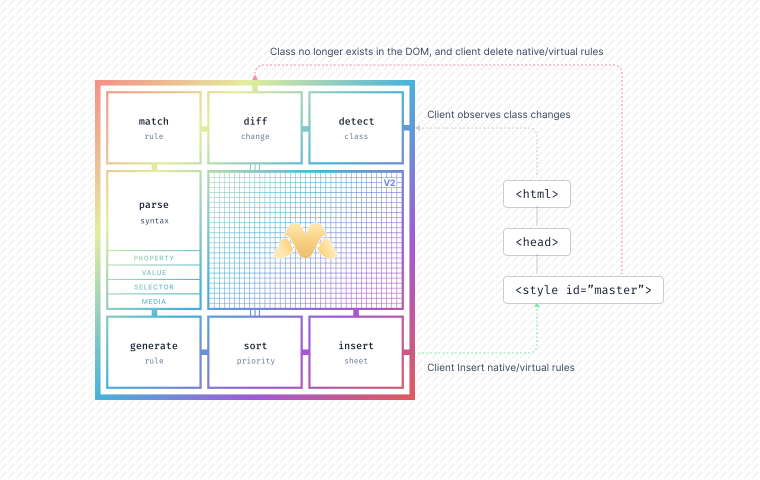
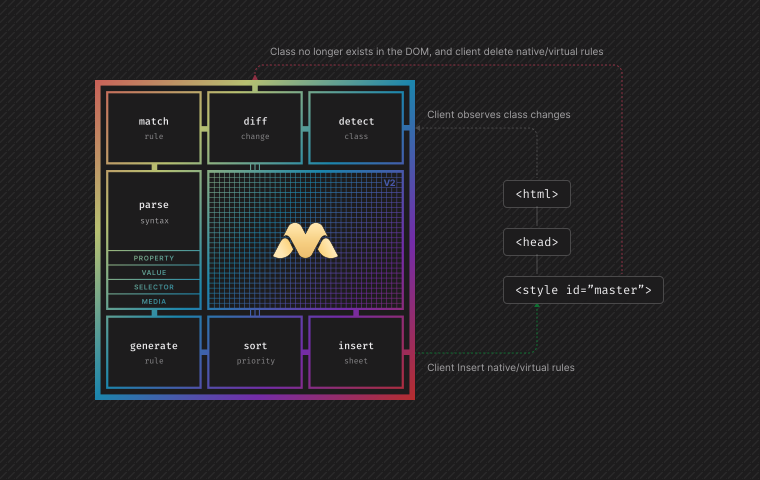
The runtime engine uses the standard Web APIs - Mutation Observer to observe DOM class changes at runtime. It keeps active DOM usage, generated rule cache, and retained mutation rules as separate states so the browser does not need to delete and recreate CSS rules during every interaction.
It is packaged as @master/css-runtime. Most applications start it through a framework integration or a bundler entry:
import CSSRuntime from '@master/css-runtime'import manifest from 'virtual:master-css-manifest'import emittedGlobals from 'virtual:master-css-emitted-globals'CSSRuntime.create({ manifest, emittedGlobals }).observe()Direct browser delivery is also possible when a page is not bundled, but it is not the only runtime path:
<head> <link rel="stylesheet" href="/assets/master-css-base.css"> <script type="module" src="/assets/master-css-runtime.js"></script></head>The following continuous DOM manipulation takes you to understand the behavior of the CSS runtime when the browser is running:
Insert an element with a Master CSS class name into the DOM
const h1 = document.createElement('h1')h1.className = 'text-center'A new node <h1> is inserted into the DOM tree:
<h1 class="text-center">Hello World</h1> The runtime engine observes a new node with the class text-center and ensures the corresponding CSS rule:
.text\:center { text-align: center } Added Master CSS class names to elements in links
h1.classList.add('font:6xl')Add class name font:6xl to <h1>
<h1 class="font:6xl text-center">Hello World</h1>The runtime engine observes that <h1> adds the new class name font:6xl and ensures the corresponding CSS rule:
.font\:6xl { font-size: 3rem } .text\:center { text-align: center}Remove the Master CSS class name from the connected element
h1.classList.remove('text-center')Remove class name text-center from <h1>
<h1 class="font:6xl text-center">Hello World</h1>The runtime engine observes that the class name text-center is removed from <h1> and updates active usage immediately. Mutation-driven cleanup may retain the generated rule briefly so a fast remove/re-add does not churn the browser CSSOM. After retained-rule cleanup, the unused rule can be deleted:
.font\:6xl { font-size: 3rem}.text\:center { text-align: center } Removes an element with a Master CSS class from the DOM
h1.remove()Remove the <h1> with class font:6xl
<h1 class="font:6xl">Hello World</h1> The runtime engine observes that the <h1> element with the class name font:6xl is removed and updates active usage immediately. If no connected element still uses font:6xl, the generated rule can be retained until idle cleanup or an explicit forced cleanup removes it:
.font\:6xl { font-size: 3rem } All active DOM class counts have been removed
At this point the DOM no longer uses those Master CSS classes. Runtime CSSOM cleanup is allowed to happen later for MutationObserver-driven removals, while direct deleteClassRules(...) calls still remove rules synchronously.
Due to its runtime execution nature, you can modify the class name directly in the browser by inspecting the element and seeing its changes.
Running style sheet
Where are the generated CSS rules inserted? The runtime engine appends <style id="master-css"> in <head> during initialization:
<head> <meta charset="utf-8"> <meta name="viewport" content="width=device-width, initial-scale=1"> <link rel="stylesheet" href="/assets/master-css-base.css"> <script type="module" src="/main.js"></script> <style id="master-css"></style> </head>It uses the .insertRule() and .deleteRule() methods of Web APIs - CSSStyleSheet to manipulate native CSS rules. The text content of style#master-css is not a reliable live view after the runtime starts; inspect the stylesheet object when you need to see the current CSSOM.
Still, you can detect the CSS rules in the current style sheet like this:
const sheet = document.querySelector('style[id="master-css"]').sheetconsole.log(sheet.cssRules)When runtime code needs project tokens, modes, or component definitions, load the compiled runtime inputs from the integration. virtual:master-css-manifest resolves the canonical project-level manifest discovered from the CSS entry, and virtual:master-css-emitted-globals records variables and keyframes that the entry already emitted.
import CSSRuntime from '@master/css-runtime'import manifest from 'virtual:master-css-manifest'import emittedGlobals from 'virtual:master-css-emitted-globals'CSSRuntime.create({ manifest, emittedGlobals }).observe()The manifest tells the runtime how to interpret project-specific tokens, modes, components, utilities, and variants. The emittedGlobals object is narrower: it only records variables and keyframes that the build already emitted from the CSS entry output. Dynamic classes can still be generated later, but shared global CSS is not duplicated when those classes reference an already-loaded variable or animation.
Runtime state
Runtime rendering separates the question "is this class currently used by the DOM?" from "does the runtime already have generated CSS for this class?"
| State | Meaning |
|---|---|
classCounts | Active connected DOM usage. It updates immediately when observed elements are added, removed, or change class names. |
classUtilities | Generated rule cache. It can include rules that are active, warmed, hydrated, or retained for reuse. |
retainedClassNames | Mutation-generated rules that are no longer used by the DOM but are intentionally kept for idle cleanup or fast reuse. |
Direct runtime APIs are rule APIs, not DOM usage APIs. ensureClassRules(...classNames) synchronously generates or reuses rules and is the explicit warming path before inserting a large dynamic view. deleteClassRules(...classNames) synchronously removes generated rules and bypasses retention. The MutationObserver path is more conservative: removed DOM classes leave classCounts immediately, then their generated rules can be retained and cleaned later outside the interaction window.
Interaction-heavy screens
Runtime and progressive rendering work best when the classes used during interaction are already generated, hydrated, retained, or warmed. A large interaction that inserts many elements with first-time class names still asks the browser to process DOM changes and new CSS rules in the same frame window.
For highly interactive UI such as editors, builders, data grids, virtualized lists, drag surfaces, or dashboards with many per-item values, prefer a mixed strategy:
- Keep stable layout, typography, state, and component classes in Master CSS.
- Warm predictable runtime classes with
ensureClassRules(...)before inserting a large dynamic view. - Use inline styles or CSS variables for volatile per-element values such as coordinates, dimensions, transforms, or user-generated colors.
- Use top-level native CSS or component-authored CSS for large repeated interaction states that are easier to model as selectors than as many runtime-generated utilities.
This does not change class syntax or cascade semantics. It is a delivery choice: avoid making the browser generate a large number of new utility rules during the same user interaction that mutates a large DOM subtree.
Project manifest delivery
virtual:master-css-manifest is the project-level runtime input. It represents the compiled CSS entry graph, so it can include project tokens, modes, component definitions, utility definitions, variants, and managed keyframes.
During development, integrations can serve that manifest as an inline virtual module. In production runtime builds, official integrations may emit it as a hashed JSON asset and make the virtual module import that asset before the runtime starts. Runtime-only pages need this JSON before they can interpret classes, so integrations that inject the runtime can also add:
<link rel="modulepreload" as="json" crossorigin href="/assets/master-css-manifest.<hash>.json">This does not change generated CSS or cascade order. It only moves discovery of the project manifest earlier so the runtime's later import can reuse the browser's preloaded module.
Progressive Rendering
Master CSS Progressive Rendering works by pre-rendering page CSS on the server or during a static build and injecting it into the page HTML.
On the client, the CSS runtime hydrates these rules into a virtual stylesheet, initializing a lifecycle-aware system that can respond to class name changes in real time. Progressive hydration depends on two pieces of data: style#master-css contains the pre-rendered CSS that can paint the first screen, and the page hydration manifest describes the generated rules that style block contains.
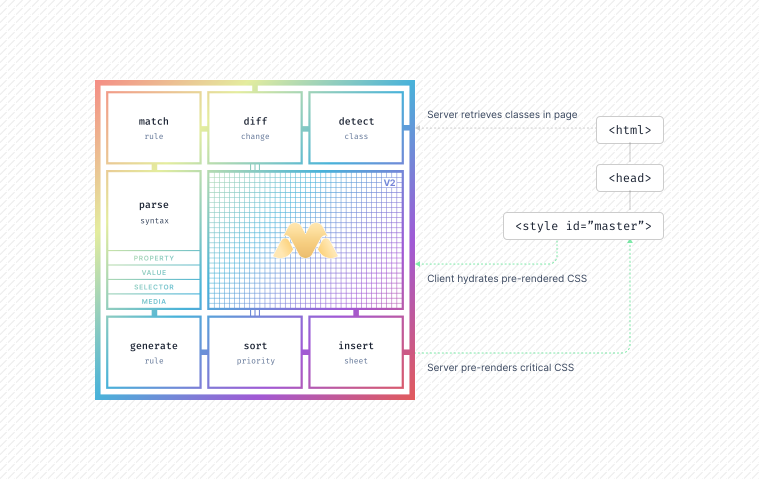
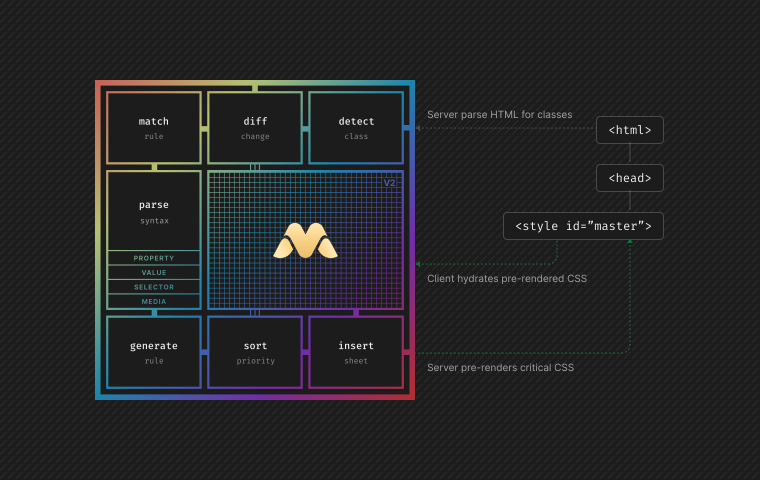
Static and pre-rendered outputs use an external page hydration manifest by default:
<style id="master-css" data-master-css-hydration-manifest="/_master-css/hydration/master-css-hydration.<hash>.json">...</style>The /_master-css/hydration/ path above is the integration-neutral route. Framework adapters can place the same artifact under their own static asset namespace. In Next.js, @master/css.next uses:
<style id="master-css" data-master-css-hydration-manifest="/_next/static/master-css/hydration/master-css-hydration.<hash>.json">...</style>This keeps the first-render CSS in the HTML while moving the runtime handoff data into a cacheable route-level JSON file. The browser can paint from style#master-css without waiting for the manifest request. When the runtime starts, it imports the manifest as a JSON module, adopts the existing native CSS rules, and continues observing dynamic classes. If the manifest is missing, invalid, fails to import, or no longer matches style#master-css, the runtime safely rebuilds the stylesheet from connected DOM classes.
After adoption, progressive rendering uses the same runtime state model as runtime rendering. Hydrated rules become runtime-managed rule objects, new classes can be generated later, and mutation-driven removals can enter the retained-rule cache before idle cleanup. This keeps the first paint deterministic while still avoiding repeated CSSOM insertion/deletion during interactive updates.
Inline script#master-css-hydration-manifest is still supported for compatibility and for dynamic SSR responses that cannot write a stable public JSON asset. Pages with no generated rules do not need a hydration manifest pointer.
Do not preload the page hydration manifest. It is different from the runtime project manifest: the browser already has the CSS needed for first paint in style#master-css, and the hydration manifest only tells the runtime how to adopt those existing rules.
Pre-rendering — SSG, SSR
For example, the following HTML:
<!DOCTYPE html><html lang="en"><head> <meta charset="utf-8"> <meta name="viewport" content="width=device-width, initial-scale=1"> <script type="module" src="/main.js"></script></head><body> <h1 class="font:5xl font:heavy">Hello World</h1></body>Render the HTML:
import { readFileSync } from 'node:fs'import { render } from '@master/css-server'import manifest from 'virtual:master-css-manifest'const indexHTML = readFileSync('./index.html', 'utf-8')const { html, hydrationManifest } = render(indexHTML, manifest, { hydrationManifest: { type: 'external', src: '/_master-css/hydration/master-css-hydration.<hash>.json' }})The server renderer parses the HTML and generates the internal style sheet plus a page hydration manifest. Official static and pre-render integrations write hydrationManifest to a hashed JSON asset and attach the URL to style#master-css:
<!DOCTYPE html><html lang="en"><head> <meta charset="utf-8"> <meta name="viewport" content="width=device-width, initial-scale=1"> <script type="module" src="/main.js"></script> <style id="master-css" data-master-css-hydration-manifest="/_master-css/hydration/master-css-hydration.<hash>.json"> .font\:5xl { font-size: 2.5rem } </style> </head><body> <h1 class="font:5xl">Hello World</h1></body>What benefits does this bring? The server renderer generates the initial page CSS (5kB) based on the class names used in the HTML, instead of the entire application source code (500kB).
This approach allows for a minimal, deterministic CSS text that is injected into the HTML, enabling fast page loads and minimal CSS output. Externalizing the hydration manifest does not make first paint faster by itself; the first paint still comes from the inline style#master-css. It reduces HTML transfer and parse pressure as the number of generated rules grows, and lets the route-level handoff data be cached separately.
CSS hydration
Master CSS hydration is the process that restores the server-side or build-time rendered CSS on the client. This includes reusing the pre-rendered CSS structures, persisting the application CSS state, and reconstructing the style sheet into virtual memory.
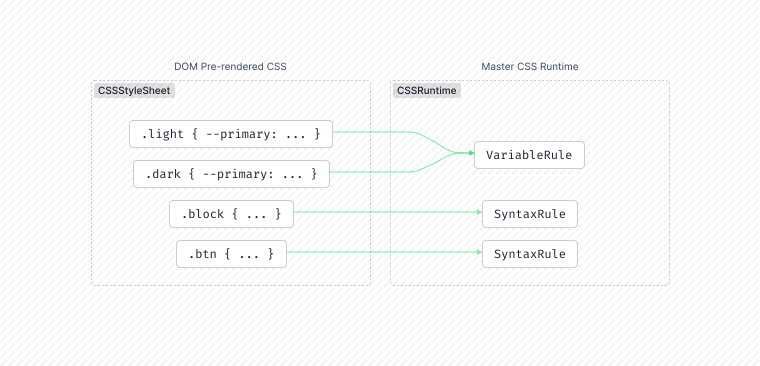
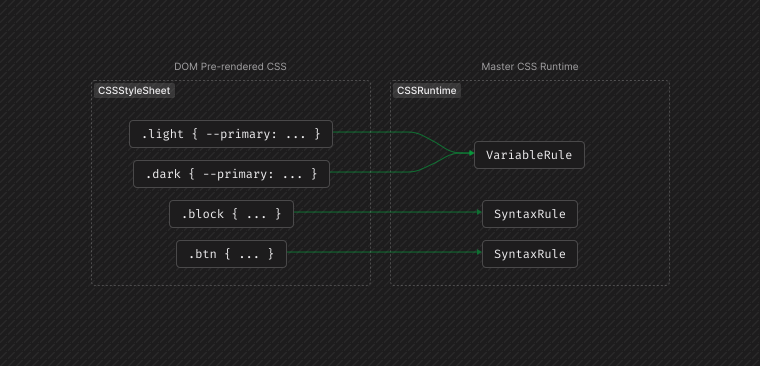
The runtime reads explicit hydrationManifest options first. Without an explicit option, CSSRuntime.create() reads inline script#master-css-hydration-manifest for compatibility. When runtime.needsHydrationManifest() is true, call await runtime.loadHydrationManifest() before runtime.observe() to import the URL from style#master-css[data-master-css-hydration-manifest].
Each manifest rule stores the class name, layer, priority, selector text, generated CSS text, and any referenced variables or animations. During hydration, the runtime compares that IR with the native rules already present in style#master-css. When they match, it attaches those native CSS rules to runtime-managed rule objects instead of regenerating them.
Once hydrated, Master CSS can efficiently detect new or removed class names and update styles accordingly, without needing to reparse or regenerate previously defined rules. Classes that were not present in the initial HTML are still generated at runtime. Classes removed after hydration leave classCounts immediately; their generated rules may be retained briefly and removed later by idle cleanup or by an explicit flushRetainedClassRules() call.
The CSS runtime then takes over to detect any changes in dynamic class names.
This page hydration manifest is different from the project manifest and emittedGlobals. The project manifest tells the runtime how to interpret tokens, modes, components, utilities, and variants. emittedGlobals records variables and keyframes that the CSS entry already emitted. The page hydration manifest only describes the CSS rules that were generated into one rendered page.
Static Rendering
Static rendering is a zero-runtime rendering mode where the build scans source files, finds complete Master CSS class strings, validates them with the active engine manifest, and writes the resulting CSS before deployment.
The source scanner does not observe the DOM and does not execute application code. Its input is source text, CSS entries, scanner options, and the compiled project manifest. Its output is a CSS asset that the browser loads like any other stylesheet.
The CSS entry point is explicit: import @master/css from the stylesheet that should receive generated Master CSS. In static mode, integrations replace that import with generated CSS and treat the same stylesheet as a native CSS pruning root.
Load the scanning context
The integration creates a source scanner with its default source discovery, optional source directives, optional fixed classes, and the project CSS entry graph. During development, integrations use their host watch, HMR, or invalidation system to reset or update this context.
@import '@master/css';Add @source only when this stylesheet must include source outside the integration's normal scan path or define a scoped native CSS pruning root.
Scan source text
Source files such as .html, .js, .jsx, .ts, .tsx, .vue, .svelte, .astro, .md, and .mdx are scanned as text. The scanner collects candidate class strings from markup and string literals, then filters obvious non-class tokens before validation.
<button class="btn text-center">Save</button>Validate candidates
Each candidate is passed through the Master CSS engine. Valid classes insert rules into the same layers used by runtime and server rendering; invalid candidates are cached and skipped on later scans.
@components { btn { @compose inline-flex px:md; }}With this project manifest, btn is valid because the project defines it, and text-center is valid because it is a built-in utility. Manifest-defined classes are still on-demand: defining btn does not emit anything until btn appears in scanned source or in the scanner's fixed class list.
Compose final CSS
The generated stylesheet contains the valid Master CSS rules, retained native CSS from managed style entries, and any referenced variables or keyframes needed by those rules.
@layer components { .btn { display: inline-flex; padding-left: 1rem; padding-right: 1rem; }}@layer utilities { .text\:center { text-align: center; }}Generated stylesheet entry
In static mode, import the generated stylesheet from the stylesheet your framework already bundles.
@import '@master/css';Use one @import '@master/css' entry for each generated stylesheet root. That import is also the insertion point for generated Master CSS, default base styles, theme variables, and utilities required by detected classes.
@import '@master/css' may be placed anywhere inside the top-level CSS import block. Ordinary CSS imports in that block are still emitted before generated Master CSS; keep the Master CSS import before normal style rules.
Native CSS entries
Regular CSS outside Master CSS directives remains native CSS. When a stylesheet imports @master/css, integrations treat that stylesheet as a pruning root by default and prune class selectors against detected source classes.
Those native rules can also pull matching theme variables referenced by var(--*) and managed @theme keyframes referenced by animation declarations. Add @preserve native; when native CSS must be preserved.
@import '@master/css';.native-card { border: 1px solid rgb(0 0 0 / 12%);}.unused-card { color: red;}<article class="btn native-card">Card</article>The generated CSS contains .native-card and .btn when both classes are scanned. .unused-card is removed because no scanned source uses it.
Dynamic class limitations
Static rendering depends on complete class strings that exist in scanned source files. It cannot evaluate conditions, run helper functions, resolve remote content, or predict classes assembled by string concatenation.
Do not construct partial class names.
const className = 'bg:' + (error ? 'red': 'green')Map states to complete class names.
const className = error ? 'bg:red' : 'bg:green'Pass dynamic values through CSS variables while keeping the class static.
<div className="font-size:$size@sm" style={{ '--size': size }}></div>For the full source scanning model, see Scanning latent classes. For native CSS pruning, see Native CSS pruning.
Shared rendering pipeline
Rendering modes change delivery, not the authoring model. The source of truth is the project CSS entry graph. A stylesheet becomes part of that graph when it contains a top-level @master entry; marker or imports @master/css. Use @master entry; when the file only needs to declare manifest input, and use @import '@master/css' when the stylesheet should also receive generated CSS in static builds.
@import '@master/css';@settings { root-size: 16;}@theme { --color-primary: #4f46e5; --breakpoint-md: 48rem; @keyframes fade-in { from { opacity: 0; } to { opacity: 1; } }}@custom-variant motion-safe { @media (prefers-reduced-motion: no-preference) { @slot; }}@components { btn { @compose inline-flex items-center px:md py:xs r:md; background: var(--color-primary); }}These CSS-first directives are manifest inputs. The compiler lowers tokens, managed keyframes, settings, variants, components, utilities, and native composed rules into a MasterCSSManifest. Runtime rendering, static rendering, server rendering, language tooling, linting, and framework integrations all consume that same IR, so class syntax and cascade behavior stay consistent even when CSS is delivered differently.
| Artifact | Produced by | Used by | Purpose |
|---|---|---|---|
| CSS entry graph | Project stylesheets with @import '@master/css' or the lightweight @master entry; marker | Compiler, integrations, static renderer | Authoring source for tokens, settings, variants, managed styles, source directives, and native CSS roots. |
MasterCSSManifest | @master/css-compiler and @master/css-project | Engine, runtime, server renderer, scanner, linting, language tooling | Shared IR that describes how class names become sorted CSS rules. |
virtual:master-css-manifest | Official build integrations | Application runtime code and framework integrations | ESM module for the canonical project-level manifest discovered from the CSS entry graph. In production runtime builds, this module may import an emitted project manifest JSON asset. |
| Project manifest JSON asset | Official runtime integrations | virtual:master-css-manifest facade and the runtime | Cacheable JSON form of the project manifest. Pure runtime pages can preload it because the runtime needs it before interpreting project classes. |
virtual:master-css-emitted-globals | Static and build integrations | Runtime code | Counts variables and keyframes already emitted by the CSS entry output, so runtime rendering does not insert duplicate global CSS. |
| Hydration manifest | Server rendering and progressive integrations | Runtime hydration | JSON rule IR with version: 1, used to map style#master-css back into runtime-managed rule objects. |
| Next build manifest | @master/css.next when manifest is enabled | Build analysis and reporting | Route/output report for rendered files; it is separate from the runtime hydration manifest. |
Comparisons
This section provides a detailed comparison of different rendering modes. Each mode is evaluated based on various criteria such as application scenarios, performance, and generated source.
| Modes | Progressive | Runtime | Static | Pre-render |
|---|---|---|---|---|
| Technologies | ||||
| CSR (Client-side Rendering) | - | - | ||
| SSR (Server-side Rendering) | - | - | ||
| SSG (Static Site Generation) | - | - | ||
| Frameworks | ||||
| Master CSS | ~27kB | |||
| Tailwind CSS | Dev | - | ||
| Uno CSS | ~53kB | |||
| Runtime Overhead | ||||
| JavaScript runtime | Zero | Zero | ||
| Style calculation | Hydrated + dynamic | Dynamic | Prebuilt | Initial |
| Memory overhead | Runtime cache | Runtime cache | CSS bundle | Minimal |
| Page Load Speed | ||||
| Render-blocking CSS | Internal | Internal | External | Internal |
| Render-blocking JS | Defer | Yes | No | No |
| Pre-rendering | ||||
| CSS Sources | ||||
| Possible CSS bytes for a page | ~5kB | 0kB | ~400kB | ~5kB |
| Source of CSS bytes | Page | Page | Bundle | Page |
| The source of generated CSS | Attribute | Attribute | Raw | Attribute |
| Capability | ||||
| Class concatenation | Yes | Yes | No | Initial |
| Class interpolation | Yes | Yes | No | Initial |
| Classes in .html | Yes | Yes | Yes | Yes |
| Classes in .js, .jsx, .vue, ... | Yes | Yes | Partial | No |
| SEO metrics | ||||
| LCP (Largest Contentful Paint) | Fastest | Fastest | ||
| FCP (First Contentful Paint) | Fastest | Fastest | ||
| CLS (Cumulative Layout Shift) | ||||
| INP (Interaction to Next Paint) | ||||